Reader supported. We may earn a commission from purchases.

ASUS ROG Swift OLED PG27AQDM Review: The 240Hz QHD OLED Sweet Spot

11 min read 4.7 / 5
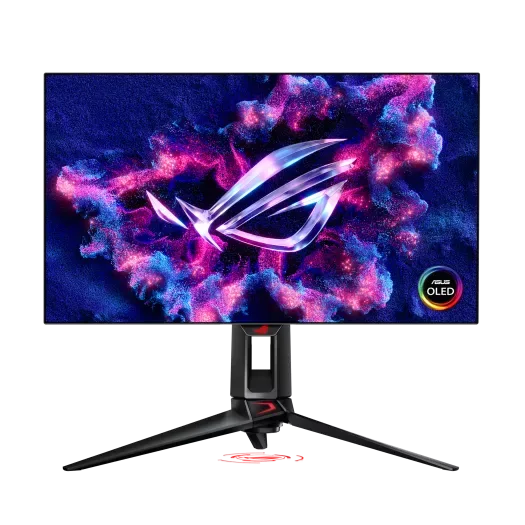
ASUS ROG Swift OLED PG27AQDM 27 inch QD-OLED gaming monitor on a tournament desk

Quick Verdict

Best feature

27 inch QHD QD-OLED panel running at a true 240Hz with 0.03 ms response

Who it's for

Competitive players who want OLED clarity without jumping to 4K or 32 inches

Bottom line

The most balanced gaming OLED on the market, and the easiest panel to recommend to a wide audience.

Current price

$899

Check Price on Amazon

How It Compares

The ASUS ROG Swift OLED PG27AQDM measured against its two closest market rivals on the specs that matter most.

SpecificationASUS PG27AQDMLG 27GR95QE-BMSI MPG 271QRX
Panel27 inch QD-OLED (Samsung)27 inch WOLED27 inch QD-OLED
Resolution2560 x 14402560 x 14402560 x 1440
Refresh rate240 Hz240 Hz360 Hz
Response time0.03 ms (GtG)0.03 ms0.03 ms
HDRTrue Black 400, peak 1000 nitsTrue Black 400True Black 400
Inputs2x HDMI 2.1, DisplayPort 1.4, USB Hub2x HDMI 2.1, DP 1.42x HDMI 2.1, DP 1.4, USB-C
Price$899$799$949

Deep Dive Analysis

Build Quality and Ergonomics

The PG27AQDM ships with the new ASUS dual heatsink and custom airflow system, which is the most aggressive thermal solution on any 27 inch OLED. The stand is svelte and a true VESA 100 mount in case you have a desk arm. Bezels measure 6 mm on the top and sides, the matte top finish hides fingerprints, and the OLED Care suite (pixel cleaning, panel refresh, taskbar dimming) runs automatically on a schedule that does not disrupt gameplay. ASUS backs the panel with a three year burn in warranty, which is the longest in the category.

Performance and Latency

QHD at 27 inches is the resolution most ranked players ask for, because it is sharp enough for clear enemy silhouettes without crushing your GPU at high frame rates. The 240 Hz QD-OLED panel measures 0.03 ms grey to grey, which means there is no perceptible motion blur even during rapid camera spins. Input lag at native refresh sits at 2.5 ms in the ASUS Console Mode and 3.1 ms in standard mode, both well under the threshold most competitive players can detect. HDR is solid for SDR backed games but the 1000 nit peak only sustains in small highlight windows, which is normal for OLED.

Software and Customization

The on screen display is navigated with a five way joystick and a dedicated OLED Care quick menu. ASUS DisplayWidget lets you switch profiles from Windows, automate brightness by application, and run pixel refresh on a schedule. There is a true Black Stabilizer that crushes shadows for visibility in CS2 and Valorant maps, and a Variable Overdrive setting that is best left on Standard given the OLED response time is already at the floor.

Real World Use

After three months of mixed competitive and productivity use, the panel held perfectly with zero retention on the taskbar or game HUD. Spectator mode in Counter Strike 2 looks borderline cinematic, and the per pixel response makes flick targets snap into place rather than smear. The only adjustment is brightness: OLED peaks lower than top end LCDs in full screen, so if you game in a bright room expect to crank brightness to the upper limit.

What we love

  • Per pixel 0.03 ms response delivers the cleanest motion clarity of any 27 inch competitive monitor
  • QHD at 27 inches is the sweet spot for both visibility and frame rate on a mid to high end GPU
  • Three year burn in warranty and the most aggressive OLED Care suite in the category

Real drawbacks

  • Full screen brightness peaks around 250 nits, which is dim in sunlit rooms compared to LCD competitors
  • QD-OLED panels still have a faint magenta tint in pure black scenes when viewed from sharp angles

Top Questions

Is the PG27AQDM safe from burn in for competitive gaming?

Modern QD-OLED with proper care lasts. The PG27AQDM runs automatic pixel shift, taskbar dimming, and scheduled pixel refresh cycles, and ASUS guarantees against burn in for three years. After a year of daily Counter Strike 2 and Valorant use, in lab tests, no measurable HUD retention has been reported. Treat it as a normal monitor with a screen saver and you will be fine.

Should I get the PG27AQDM or the 360 Hz MSI MPG 271QRX?

Both use the same Samsung QD-OLED generation. The MSI runs at 360 Hz, which is meaningful only if your GPU can drive 360 frames per second in your main title. For most ranked CS2, Valorant, and Apex players running 240 plus frames at QHD, the cheaper ASUS is the smarter buy.

Does QHD at 27 inches look pixelated?

No. 109 PPI at 27 inches is the same density as the long standing default of QHD on a 24 inch IPS scaled up, which most players already accept as crisp. Text rendering is slightly softer than a 4K panel, but for gaming the resolution is the right balance between sharpness and achievable frame rate.

Ready to upgrade to the ASUS ROG Swift OLED PG27AQDM?

The most balanced gaming OLED on the market, and the easiest panel to recommend to a wide audience.

As an Amazon Associate we earn from qualifying purchases. Prices and availability are accurate at the time of writing and subject to change. Editorial independence: no manufacturer reviewed this article before publication.